
Name-Based Lampasas County Case Searches
Lampasas County does not operate one countywide free-text case form. Start with the court, then use re:SearchTX for a name search when that court's data is available. A common surname alone can return unrelated matters, so add a first name, case type, date, judge, or court when the interface permits.
- Identify whether the matter belongs to District Court, County Court, a JP court, or a municipal court.
- Open re:SearchTX and select the Cases or Hearings tab that matches the task.
- Enter the surname and first name, using an asterisk wildcard only as the official guide permits.
- Narrow by filing date, case type, judge, attorney, or other known field.
- Open the likely result and compare its court, case number, parties, and dates with known facts.
| Field Label | Type | Required | Notes |
|---|---|---|---|
| Last Name | Text | Search-dependent | Use with more facts; wildcard support is described in the official guide. |
| First Name | Text | No | Helps separate people who share a surname. |
| Court or Case Type | Filter | No | Narrows results to the likely jurisdiction. |
| Filing or Hearing Date | Date | No | Use a known period instead of guessing an exact day. |
Lampasas County Court-First Search
The court is the most useful first filter. Felony and district civil or family records route through the District Clerk. Constitutional County Court misdemeanor, probate, and civil matters route through the County Clerk. JP1, JP2/3, and JP4 keep precinct records, while Lampasas, Kempner, and Lometa municipal clerks maintain city cases.
Open the District Court PDF index or County Court PDF index when the date is known. The files may reveal a cause number that makes the next search far more exact.
Lampasas County Case Number Searches
A cause number is the strongest search anchor in Lampasas County. Enter it exactly as printed on a notice, pleading, receipt, or docket PDF. The research did not establish one universal number pattern across District, County, JP, and municipal courts, so do not force a sample such as COURT-ASSIGNED CAUSE NUMBER into an invented year-code format.
If the full number fails, verify spacing, punctuation, leading zeros, and the court. A related or associated case may have a different identifier. Give the number to the clerk when an online result is absent.
Do not treat an indictment date, court date, or citation number as interchangeable with the cause number. Lampasas criminal docket fields can show several identifiers and dates in one row. Read the column heading first. A clerk can often route a focused request when the caller explains where the number came from and names the court printed on the source.
Lampasas County re:SearchTX Controls
The official re:SearchTX quick guide documents Cases and Hearings tabs, a Search By menu, advanced controls, Search and Reset buttons, sorting by filed date or case number, and result actions for summaries, alerts, exports, folders, sharing, and filing. Judge and party-related fields can support an asterisk wildcard.
The statewide interface provides the public search surface shown here.
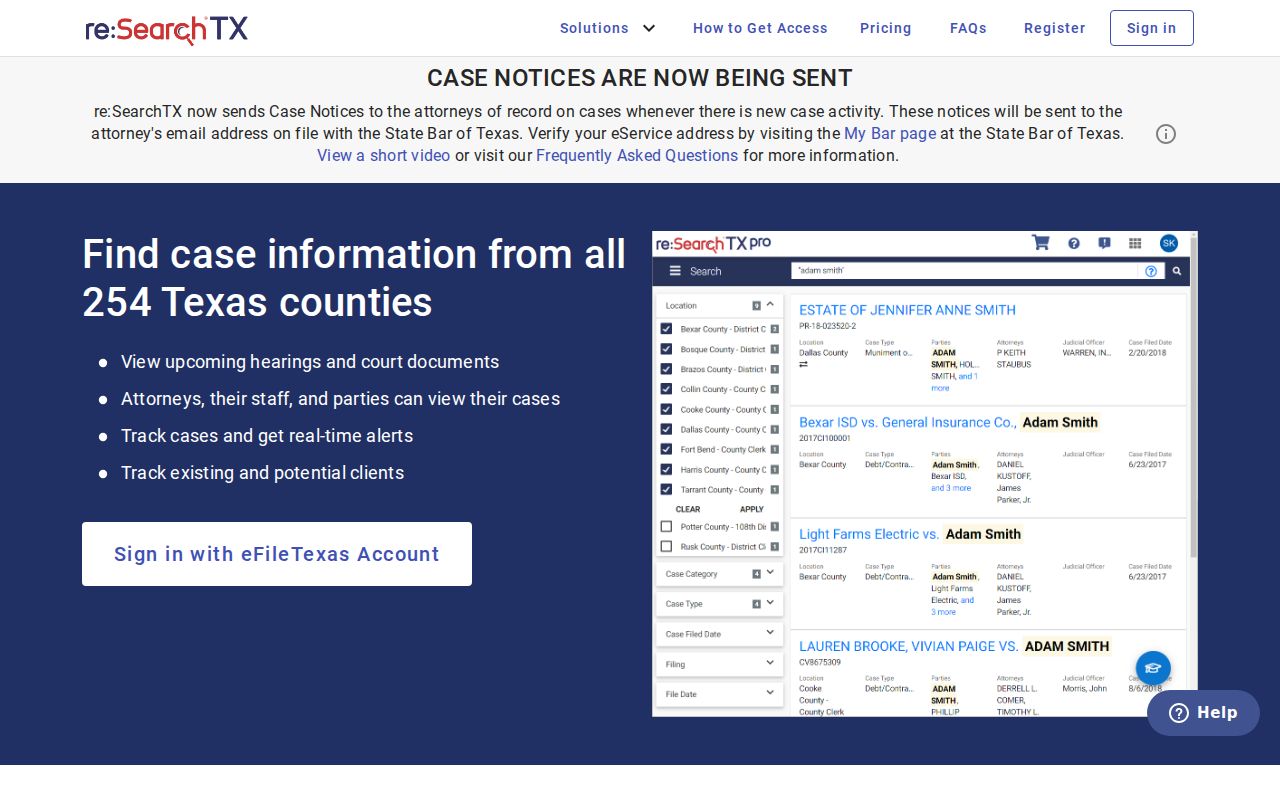
The image highlights the statewide entry point, but a result still depends on court participation, record security, and user access.
Lampasas County Case Search Results Explained
A result is an index to a case, not always the complete file. Depending on the court and access level, re:SearchTX can show a case summary, parties, attorneys, judicial officers, filings, documents, and hearings. The Lampasas County PDFs focus more narrowly on dated settings.
| Case Number | The court's identifier and best key for a clerk request. |
|---|---|
| Style / Parties | The public case caption; protected names may be redacted or withheld. |
| Case Type | The category, such as criminal, civil, family, or probate. |
| Filed Date | The date the case entered that court's record. |
| Status | An open, closed, disposed, or other system label that should be checked against docket events and orders. |
Document images may be limited or fee-based. A visible header with no image link does not mean the filing is missing.
The case style is also not a substitute for the record itself. A status label may lag a recent order, and a hearing entry only proves that an event was listed. Open the filing or judgment when public access allows, or ask the clerk for the specific document needed to understand the result.
Two Lampasas County Search Routes
The county and statewide sources answer different questions. Use both when a known Lampasas County case does not appear where expected.
| re:SearchTX | Lampasas County PDF Index |
|---|---|
| Participating Texas court data | District or County Court dated schedules |
| Case, hearing, filing, and document detail when allowed | Local court heading, date, setting, and status labels |
| Best for name, number, or hearing searches across the state layer | Best for a known Lampasas County court and date |
The PDFs are free to open. re:SearchTX registration and document access may vary. Neither replaces direct clerk contact for a certified or restricted record.
Lampasas County Municipal Search Splits
City cases are fragmented. Lampasas Municipal Court offers fields for citation number and date of birth, license and state, SSN and date of birth, vehicle plate and state, personal name and date of birth, or business name. Sensitive values should only be entered into the official court portal. It is a citation status and payment path, not a full docket viewer.
Kempner publishes a court calendar, forms, and payment bureau code but no stable public query. Lometa offers a resolve-citation portal that showed test mode and a balance failure during research. Call the city clerk when those tools fail. City matters must not be confused with a JP citation or District Court case.
Note: Online payment through the Lampasas city system results in conviction; contact the court before paying if another option is sought.
Which Lampasas County Cases Stay Restricted
Public access has firm limits. Juvenile, adoption, some family matters, sealed filings, protected addresses, and personal identifiers may be omitted, redacted, or shown only to an authorized user. A blank Lampasas County search does not prove that no case exists.
Texas Rule of Civil Procedure 76a addresses sealing in civil proceedings. Electronic access also depends on judiciary policy and system security. Ask the responsible clerk what public inspection or request process applies. Do not try to defeat a redaction or combine public fields to expose protected data.
Lampasas County Clerk Search Fallback
When online tools stop short, request one record from the office that keeps it. Give the court, cause number if known, party name, date range, exact document, copy type, and delivery method. Ask about current fees, certification, redaction, and turnaround before sending payment.
The District Clerk handles district civil, family, felony, and related records. The County Clerk handles County Court and probate records but states that staff do not perform public searches. Mail, phone, counter, and clerk-directed request routes therefore require a focused description.
Older district civil papers may need archival routing. The Texas State Library lists Lampasas civil case papers from 1873 through 1930 and civil minutes from 1877 through 1914, but that catalog is not a current online docket.